The Exchange/en: Porovnání verzí
(Add Exchange Broker map location (2970,2099)) |
(Broker name Exchange Broker @ 2983,2132; open via double-click or hi) |
||
| Řádek 4: | Řádek 4: | ||
== How to open == | == How to open == | ||
Find ''' | Find the '''Exchange Broker'''{{Map | ||
|X= | |X=2983 | ||
|Y= | |Y=2132 | ||
|Text= | |Text=Exchange Broker | ||
}}. Open the window by: | }}. Open the window by: | ||
* double-clicking the broker (in range), or | * double-clicking the broker (in range), or | ||
* saying | * saying <code>hi</code> nearby | ||
The window closes if you walk too far from the broker. Only one Exchange window can be open per player at a time. | The window closes if you walk too far from the broker. Only one Exchange window can be open per player at a time. | ||
Aktuální verze z 20. 10. 2026, 16:57
CZ: Česky
The Exchange (Czech: Burza) is a player buyout trading house. Sellers list an item at a fixed gold price; buyers can purchase it immediately at that price. It is not an auction and it is not the FEN (bank parcel system).
How to open
Find the Exchange Broker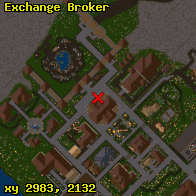 . Open the window by:
- double-clicking the broker (in range), or
- saying
hinearby
The window closes if you walk too far from the broker. Only one Exchange window can be open per player at a time.
Tabs
The Exchange has three tabs:
Buy
Browse active listings by category. You can sort by name and price, page through results, and search by name. Magic / unique items and runes often have a preview (item gump). You cannot buy your own listing. After confirming, gold is taken and the item goes to your backpack (or to the ground at your feet if the backpack is full).
Sell
- Target the item.
- Enter the buyout price in gold.
- Choose listing duration (this sets the fee).
- Confirm — the item moves to the Exchange and a non-refundable listing fee is charged immediately.
Category is detected automatically. Containers must be empty.
My Items
Shows your active and expired listings. Here you can:
- Claim — collect gold earned from sales (not banked automatically; payout waits on the character and is placed in the backpack).
- Withdraw — cancel the listing and return the item to your backpack (the listing fee is not refunded).
Fees and duration
The fee is a percentage of the buyout price, paid when listing, minimum 1 gp, never refunded:
| Duration | Fee |
|---|---|
| 24 hours | 1 % |
| 3 days | 3 % |
| 10 days | 4 % |
| 30 days | 5 % |
The default choice is the longer duration (30 days). When a listing expires it disappears from Buy, but stays under My Items so you can withdraw the item.
Limits and restrictions
- Maximum 50 listings per character (active + expired combined).
- Cannot sell: newbie items, soul bound, locked / locked-down items, your backpack, bound tinctures of experience, non-empty containers, or items with no supported category.
- Purchase and payout currency is gold (gold coins).
Categories
Listings are grouped into:
- Weapons
- Armor
- Consumables
- Resources (including tools)
- Containers
- Rare (runewords, runes, and similar)
- Deeds (deeds, pet claim tickets, some scroll / deed types)
